
let-me-in
Protect any web service with ECDSA time-signed headers.
No shared secrets. No passwords in config files.
Protect any web service with ECDSA time-signed headers.
No shared secrets. No passwords in config files.
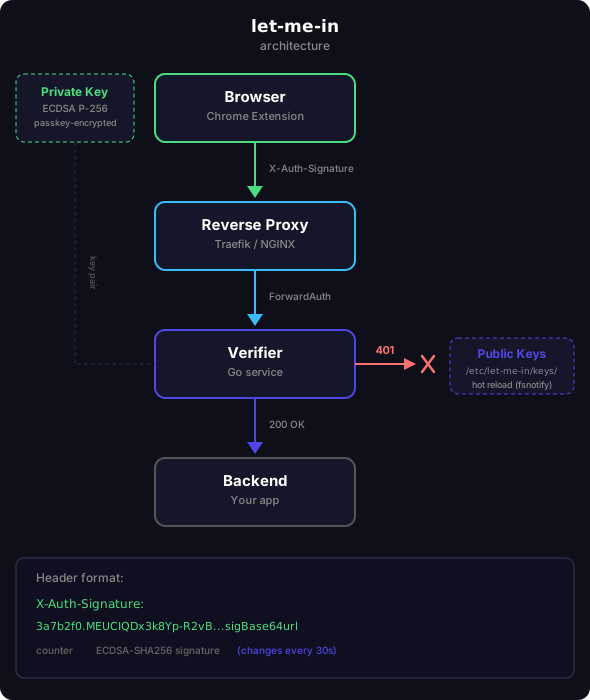
The Chrome extension generates an ECDSA P-256 key pair. The private key is encrypted with your passkey (Touch ID / Windows Hello) and never leaves the browser.
Copy the public key PEM and drop it into the verifier's keys folder. The verifier picks it up automatically — no restart needed.
Every matching request gets an X-Auth-Signature header containing a compact time counter, a public-key fingerprint, and an ECDSA signature. The signature changes every 30 seconds.
Traefik or NGINX forwards the request to the verifier. It checks the time window, finds the matching public key by fingerprint, and verifies the signature. Valid? 200. Invalid? 401.
GET /api/v1/data HTTP/1.1
Host: merchant.example.com
X-Auth-Signature: A4dQwA.tY8O0vXjKZ6F0Q2V8m3r0Jk1p9dW7aBcDeFgHiJkLmM.MEUCIQDx3k8Yp-R2vB...dGhpcyBpcyBhIHNpZ25hdHVyZQ
                  ────── ───────────────────────────────────────────── ──────────────────────────────────────────────────
                  counter key fingerprint                              ECDSA-SHA256 signature
                  (base64url)                                          (base64url, changes every period)
Counter = floor(unix_time / period), encoded as minimal big-endian bytes in base64url. The key identifier is base64url(SHA-256(SPKI_DER(public_key))). Server accepts ±1 window for clock skew.
Generates keys, signs requests, manages URL patterns.
Download .zipNeeds desktop Chrome, Edge or Brave. Open this page there to install.
let-me-in-extension.zipchrome://extensions
paste it into the address bar — pages can't link thereKeep the folder where it is: Chrome derives the extension ID, and with it your passkey, from its path. To update, replace the folder's contents with the new ones and press ↻ on the extension.
ForwardAuth service. Works with Traefik and NGINX.
docker pull docker.pwypp.com/tools/let-me-in/verifier:latest
git clone <repo> && cd let-me-in/verifier
docker build -t let-me-in-verifier .
Traefik's ForwardAuth middleware delegates authentication to the verifier.
services:
  let-me-in:
    image: docker.pwypp.com/tools/let-me-in/verifier
    container_name: let-me-in-verifier
    restart: unless-stopped
    volumes:
      - ./keys:/etc/let-me-in/keys:ro
    environment:
      HEADER_NAME: X-Auth-Signature
      PERIOD: "30"
      WINDOW: "1"
http:
  middlewares:
    let-me-in:
      forwardAuth:
        address: "http://let-me-in-verifier:8080/verify"

  routers:
    my-service:
      rule: "Host(`app.example.com`)"
      middlewares:
        - let-me-in
      service: backend
      entryPoints:
        - websecure
# Copy PEM from the extension and save it:
cat > keys/mike.pem <<'EOF'
-----BEGIN PUBLIC KEY-----
MFkwEwYHKoZIzj0CAQYIKoZIzj0DAQcDQgAE...
-----END PUBLIC KEY-----
EOF

# Verifier auto-reloads — no restart needed
NGINX's auth_request directive works the same way — subrequest to the verifier.
Same Docker container as above.
upstream let_me_in {
    server let-me-in-verifier:8080;
}

server {
    listen 443 ssl;
    server_name app.example.com;

    # Protected location
    location / {
        auth_request /let-me-in-verify;
        proxy_pass http://backend;
    }

    # Internal auth subrequest
    location = /let-me-in-verify {
        internal;
        proxy_pass http://let_me_in/verify;
        proxy_pass_request_body off;
        proxy_set_header Content-Length "";
        proxy_set_header X-Auth-Signature $http_x_auth_signature;
    }
}
| Variable | Default | Description |
|---|---|---|
KEYS_DIR | /etc/let-me-in/keys | Directory to watch for .pem public key files |
HEADER_NAME | X-Auth-Signature | HTTP header to read the signed token from |
PERIOD | 30 | Time window in seconds (must match extension) |
WINDOW | 1 | Clock skew tolerance (±N periods) |
LISTEN | :8080 | HTTP listen address |
.pem file into the keys directory.pem file — verifier stops accepting that key immediately.pem file (e.g. mike.pem, alex.pem)ECDSA P-256 — the same curve used in TLS. Private key never leaves the browser. Public key on the server can't forge signatures.
Each signature is valid for one time window (default 30s). Intercepted tokens expire before they can be reused.
Private key encrypted with AES-256-GCM. Decryption requires biometric authentication (Touch ID / Windows Hello) via WebAuthn.
Unlike TOTP or API keys, compromising a server reveals nothing useful. The public key can't sign requests.